
The Google November 2026 Core Update is actively rolling out across Google Search, causing ongoing ranking fluctuations for publishers and businesses. While the update remains in progress, site owners should monitor query-level performance in Google Search Console, hold off on major structural changes, and audit content quality before making reactive edits.
What is happening with the Google November 2026 Core Update right now
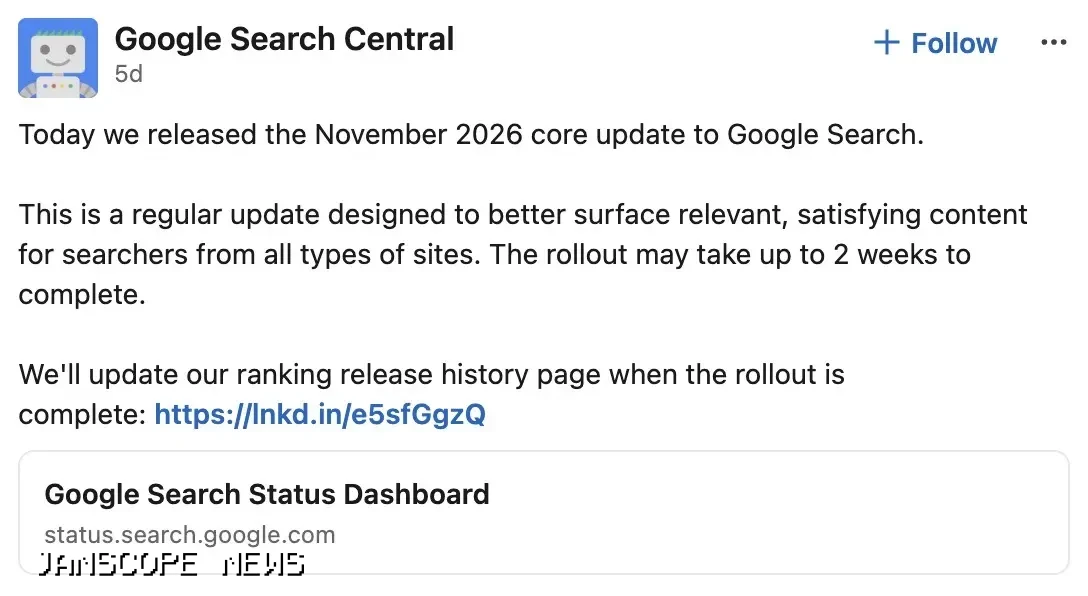
Google confirms active algorithm deployments on the official Google Search Status Dashboard, which logs the exact start and completion timestamps for every broad core update. Because the November 2026 deployment is still underway, search results have not settled into a final state.
Rankings often bounce up and down multiple times during an active core rollout. A page that drops on Tuesday can recover by Friday without you touching a single line of code.
Industry tracking from platforms like the Semrush blog on the November 2026 core update highlights elevated SERP volatility across competitive niches. Until Google marks the incident as resolved on its status dashboard, any traffic diagnosis you run is based on incomplete data.
Why you should avoid panic edits during an active rollout
Making sweeping changes to templates, internal links, or URL structures while Google is still updating its systems creates a measurement problem. You will not know whether a subsequent traffic shift came from the algorithm finishing its run or from your own edits.
Google's ranking systems evaluate pages across multiple signals, and those signals recalibrate in stages. Cutting content or rewriting dozens of pages mid-rollout can accidentally strip out relevance signals that the algorithm was about to reward.
Save your engineering hours for logging data right now. Take daily snapshots of your top landing pages and core commercial queries so you have a clean baseline once the dust settles.
What to monitor in Google Search Console today
You do not need expensive third-party suites to see how this rollout is touching your domain. Open Google Search Console and focus on three specific views.
Compare query impressions and clicks over the last seven days against the prior period to spot which topic clusters are moving.
Separate branded search traffic from non-branded search traffic so brand demand does not mask organic ranking losses.
Check device performance splits between mobile and desktop to see if layout shifts or page experience issues correlate with drops.
Pay close attention to pages that lose impressions rather than just clicks. An impression drop usually signals a position change, while a click drop with steady impressions points toward SERP layout changes or stronger competitor snippets.
How core updates differ from spam updates and manual actions
Many site owners confuse a broad core update with a penalty. A core update does not target a specific policy violation on your website.
Google describes core updates as broad changes designed to improve how its systems assess content overall. When your pages slip, it typically means Google's systems found other pages on the web that better satisfy the intent behind those queries.
If your site had a manual action, you would see a direct notice inside the Security and Manual Actions tab in Search Console. Core updates never trigger dashboard warnings or notifications.
Where official guidance and real-world SEO experience diverge
Google's standard documentation tells site owners to focus on helpful, reliable, people-first content. That advice is accurate in principle, yet it leaves practitioners guessing when a well-researched site still loses ground.
In practice, core updates frequently reward clear topical authority, fast satisfaction of user intent, and strong technical hygiene. As ongoing discussions in Search Engine Roundtable's November 2026 industry coverage show, publishers also have to account for shifting SERP features and AI-driven answer blocks competing for clicks.
Sites that bury the main answer under long introductions or pad articles with repetitive sections tend to lose visibility first. Real recovery usually comes from tightening page focus and proving firsthand expertise rather than chasing surface-level word counts.
Step-by-step audit to run once the rollout finishes
Wait until the Google Search Status Dashboard confirms that the rollout is complete before executing changes. Once that confirmation goes live, work through this sequence.
Export your top 50 pages by organic traffic loss from Google Search Console.
Search your primary lost queries in an incognito browser and inspect the top five ranking pages.
Compare what those ranking pages deliver against your own page, looking for missing data, outdated steps, or clearer formatting.
Check technical crawl logs and sitemaps to verify that Googlebot can render your main content without blocked scripts or broken redirects.
Consolidate or prune thin, overlapping articles that compete against each other for the same search intent.
Keep a changelog of every URL you update and the exact date you publish the revision. That log lets you correlate future ranking movement with specific improvements.
Common questions about the Google November 2026 Core Update
How long does a Google core update rollout usually take?
Google states in its search documentation that core updates typically take around one to two weeks to complete, though timelines vary depending on system complexity. Check the Google Search Status Dashboard for the official completion timestamp for this specific release.
Can my site recover before the next core update arrives?
Yes, sites can see partial movement between major core updates as Google's systems continuously refresh and re-evaluate indexed pages. However, major reversals of core update losses often take until a subsequent broad core update processes your site's improvements.
Does deleting low-traffic pages help recover from a core update?
Removing genuinely thin, duplicate, or outdated pages that get zero organic traffic can improve overall site quality signals. Avoid deleting pages that still earn steady impressions, backlinks, or conversions, and redirect consolidated URLs to the closest relevant page.
Should I disavow backlinks after a core update hit?
No, Google's systems generally ignore low-quality spam links automatically, and core updates are not link-spam penalties. Use the disavow tool only if you have a manual action for unnatural links or clear evidence of a paid link scheme.
Why did my rankings drop if I never used AI-generated content?
Core updates evaluate overall usefulness, intent alignment, and competitor quality rather than acting as an AI content detector. Human-written pages still lose rankings when competitors publish clearer, better-structured, or more current answers.
How does AI Search affect traffic during a core update?
Expanded AI summaries and shifting search interfaces, such as the changes examined in The New York Times coverage of Google Search and AI, can reduce click-through rates even when your organic position stays steady. Track impressions alongside clicks so you can separate interface shifts from algorithm ranking drops.
Could a technical bug explain my sudden traffic drop instead?
Yes, server errors, accidental noindex tags, broken canonicals, or rendering issues often coincide with algorithm rollouts by pure coincidence. Always check Search Console's Page Indexing report and server logs before blaming a core update.
What is the first thing to check if my WordPress site lost rankings?
Verify that your XML sitemaps are accessible, your robots.txt file is not blocking key folders, and recent plugin updates did not break page rendering. Technical regressions are far faster to fix than content quality evaluations.



No comments yet — be the first to share your thoughts!